
The snagging inspection is done. The inspector has left. Twenty-four hours later, a PDF arrives in your inbox. It has a cover page, a summary section and then pages of numbered findings, each with a photograph, a location reference, a description and a severity classification.
For most property buyers in Dubai, this is the first professional snag report they have ever received. And the question that follows ‘what do I do with this?’ is one of the most important questions in the entire handover process.
This article explains what a professional snag report contains, how to read the severity classifications that determine which items are priorities and what to do next. Our property snagging service in Dubai page covers the full inspection process from booking through to delivery and developer submission.
What a Professional Snag Report Contains
A professional snag report from an inspection of a Dubai new-build property contains several structured sections. Understanding what each section covers and what to look for in each one allows you to use the report effectively in your developer engagement.
Executive Summary
The first section of a professional snag report is an executive summary: the property address, the inspection date, the number of items found and a breakdown by severity level. This section tells you at a glance how significant the findings are and which categories require immediate developer engagement. For most Dubai new-build properties, the executive summary shows between 40 and 80 items across multiple severity levels.
Severity Classification
Every item in a professional snag report is classified by severity typically High, Medium or Low (some reports use Critical, Major, Minor). Understanding what these classifications mean in practice helps you prioritise developer engagement and focus attention where the financial and structural stakes are highest.
High or Critical items are those with structural, safety or significant habitability implications: a waterproofing failure, a non-commissioned smoke detector, a balcony drainage gradient pointing toward the building wall, inadequate electrical earthing. These are the items to lead within your developer communication and to verify first during re-inspection.
Medium or Major items are significant quality or function failures hollow tiles across a large area, AC drainage issues, specification deviations from the SPA, major paint or plaster defects. These require remediation before the property is genuinely move-in ready.
Low or Minor items are cosmetic or minor functional issues: paint touch-ups, small grout gaps, minor door alignment, loose fixtures. These are addressed last but should still be documented and submitted.
Photographic Evidence Section
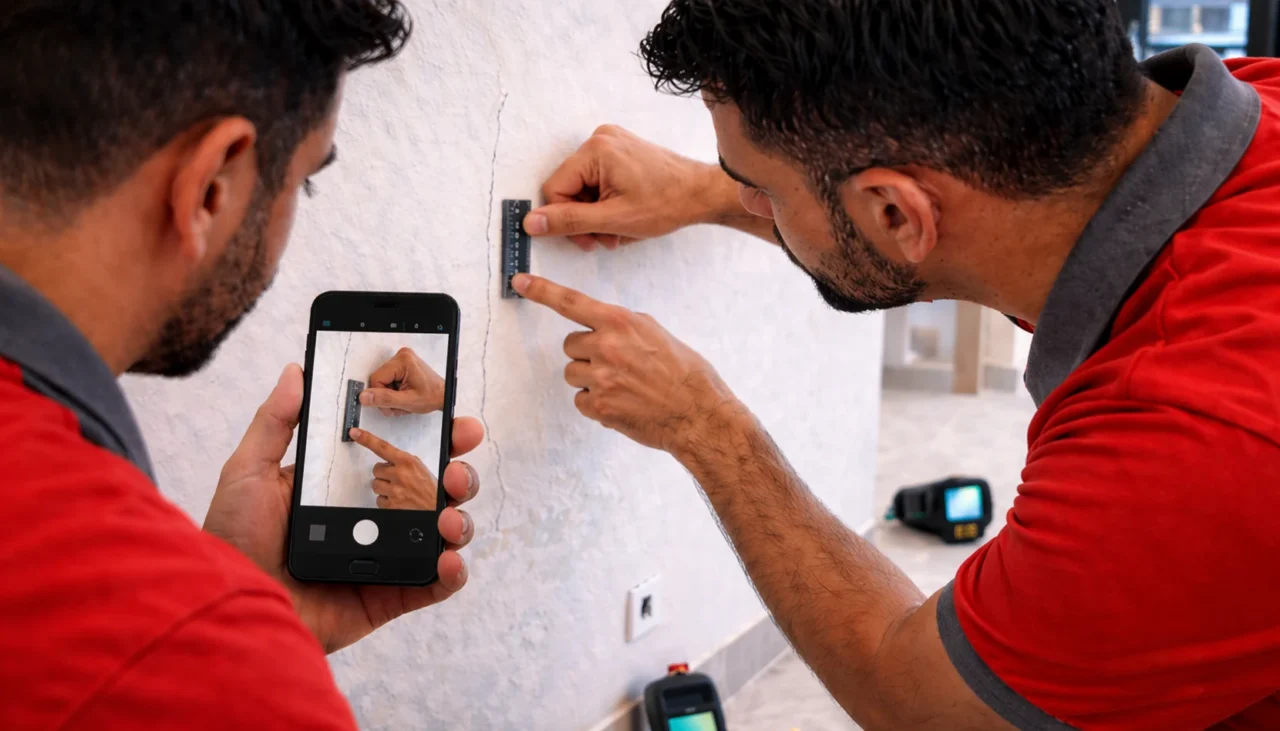
Every item in a professional snag report has a corresponding numbered photograph, cross-referenced in the findings table. The photographs should show: the defect clearly, with a scale reference where possible; the location context (room, wall, floor area); and for thermal imaging or moisture meter findings, the device output alongside the physical surface.
The photographic evidence section is what makes a snag report defensible in a developer dispute. Vague descriptions without photographs are challengeable. Location-referenced photographs are not. Our guide to smart snagging tools and what they catch explains the technology outputs thermal imaging and moisture meter readings that appear in the photographic evidence section of a professional report.
Findings Table
The findings table is the core of the snag report, a numbered, tabular record of every defect found, with location reference, description, severity classification and photograph number. This is the section you use when working through the report with the developer and the section that forms the basis of your re-inspection checklist once snag work is completed.
Thermal Imaging and Moisture Data
A professional snag report from an inspection that included thermal imaging will contain a thermal data section. Thermal images show heat distribution patterns; cold patches in external walls indicate insulation voids, warm patches in floors can indicate underfloor heating issues or concealed pipe leaks and moisture-related patterns appear distinctly in bathroom and wet area walls. Moisture meter readings are typically presented alongside the thermal data for wet area findings, providing a quantitative measure of moisture levels behind tiled surfaces.
How to Read Your Snag Report
When you receive your snag report, the first thing to do is read the executive summary. Note the total number of items, the breakdown by severity and any items specifically flagged as requiring urgent attention before handover acceptance.
Then work through the findings table from top to bottom or from High to Low severity. For each High severity item, verify that you understand what the defect is, where it is and what remediation involves. For thermal imaging findings showing moisture behind bathroom tiles, the remediation is tile removal, waterproofing membrane reapplication and retiling significant work that you need the developer to confirm they will complete before you accept possession.
The findings table also shows you the scope of what was found by location. If three bathroom items appear under a single room reference, that tells you the bathroom needs significant developer attention. If findings cluster around the balcony area, the balcony drainage and waterproofing findings are a priority theme.
What to Do With Your Snag Report

Step 1: Do Not Accept Handover Before You Have Read It
Your professional snagging inspection should be completed before your handover appointment, with the report delivered to you before you attend. Read the report specifically the executive summary and all High severity findings before signing any handover documentation.
Step 2: Submit Formally to the Developer in Writing
Submit the full snag report to the developer by email with a read receipt, referencing your unit number, the development, the inspection date and your request for a written rectification plan with a timeline. Keep a copy of the submission with a timestamp. This submission starts the developer’s DLP clock for the documented defects.
Step 3: Agree a Written Rectification Plan
Do not accept possession or sign any documentation confirming satisfactory handover until you have a written rectification plan from the developer covering all High and Medium severity items. Verbal assurances about snag work completion are not enforceable.
Step 4: Re-Inspect After Completion
Once the developer confirms snag work is complete, commission a re-inspection before signing off. The re-inspection uses the original snag report findings table as its checklist, verifying each item against its described remediation. Secondary defects introduced during remediation work are also noted. Only after the re-inspection confirms satisfactory completion should you sign any developer completion documentation.
Conclusion
A snag report is not simply a list of things that are wrong. It is the legal instrument that activates the developer’s statutory obligation to fix them. A well-compiled, photographic-evidenced, location-referenced snag report submitted in writing within the Defect Liability Period is the most powerful single document a Dubai property buyer can have at handover. Working with a professional company like Yalla Fix It ensures accurate inspection and reporting.
Reading it correctly, submitting it promptly and using it as a re-inspection checklist after snag work is complete is how the full financial benefit of a professional snagging inspection is realised. Don’t leave your investment to chance. A professional snagging inspection ensures every defect is identified and documented before handover, protecting you from costly repairs later.
Book your inspection today with Yalla Fix It and secure your rights within the Defect Liability Period.
Frequently Asked Questions
How quickly should I receive my snag report after the inspection?
A professional snagging company delivers the snag report within 24 hours of the inspection. Reports that take longer than this typically indicate that the documentation process photography, cross-referencing, severity classification was not conducted during the inspection itself.
Can I share my snag report with anyone other than the developer?
Yes. The snag report is your document. You can share it with your mortgage lender, your solicitor, your real estate agent and if required, with RERA or the Dubai Land Department. If developer disputes escalate, the snag report is the evidence base for any formal complaint or legal proceeding.
What if the developer disputes items in my snag report?
A professionally documented snag report with location-referenced photographs, thermal imaging outputs and specific descriptions is considerably harder to dispute than a buyer’s own notes. If a developer disputes specific items, request a joint inspection with both parties present to review the findings in situ. For items the developer refuses to address, the DLD enforcement route is available.
Does the snag report cover items that appeared after I moved in?
The snag report documents the condition of the property at the time of inspection. If defects become visible or manifest after you have moved in, they can still be submitted to the developer within the DLP window but they require separate documentation and submission. A post-move-in inspection can be commissioned to document newly identified DLP-covered defects.
How many items are typically included in a snag report?
A professional snag report can include anywhere from 40 to 80 items depending on the property condition. These range from minor cosmetic issues to more serious defects that require immediate attention.
Which items should I prioritise in my snag report?
High or critical severity items should always be addressed first. These include defects related to safety, structural integrity or major system failures such as waterproofing or electrical issues.
Can I move in before all snag items are fixed?
It is not recommended to move in before major defects are resolved. Accepting the property without ensuring completion of key snag items can weaken your position when requesting developer rectification later.
